Summary & Context
This post describes a reliability effort that started with a seemingly simple quota bug and led to a broader investigation of the codebase and supporting infrastructure. The root cause was not frontend formatting but inconsistent backend data.
- Project: A drive / file storage application (similar to Google Drive, Dropbox, OneDrive).
- Role: Full-Stack Developer.
- Stack: NestJS, MongoDB, React, and an S3-compatible object store (Naver Cloud).
- Area: Used storage (quota) calculation.
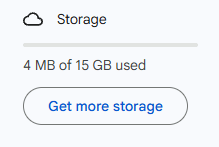
Example: Google Drive quota view
The following sections outline the root causes, the issues that were found, and a step-by-step plan for stabilization and long-term improvement. With that in mind, we start with why a negative quota matters.
Why a Negative Quota Matters
The issue first appeared as a frontend bug: the UI showed negative storage usage. Because the ticket was filed against the frontend, the natural assumption was a unit conversion problem (e.g. bytes to MB) or a formatting error. After reviewing the client code, the bug turned out to be rooted in the backend; the data coming from the API was already wrong.
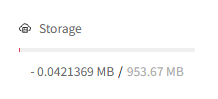
A negative quota is not just a display bug. It is a signal that multiple sources of truth are no longer aligned.
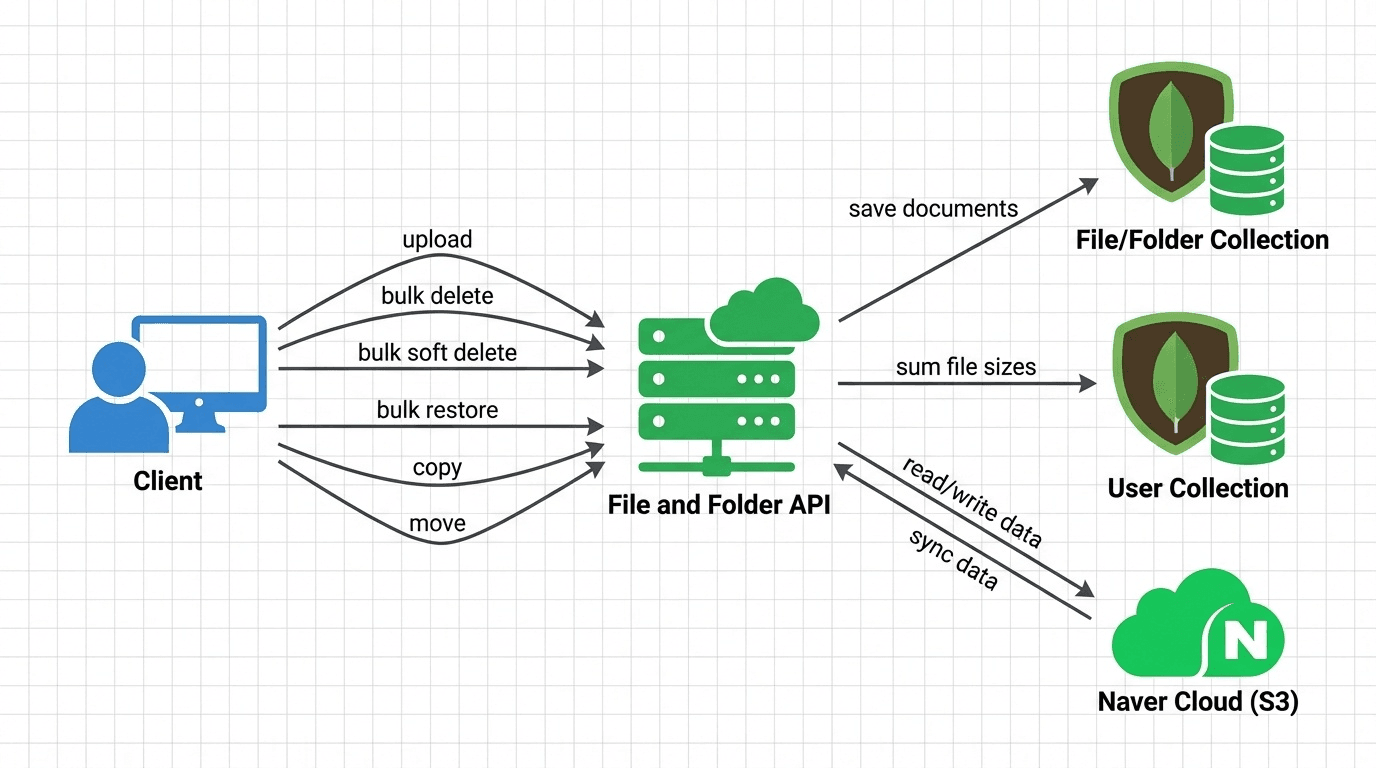
In this system, storage usage depends on consistency between three layers:
S3 objects ↔ Database ↔ User storage tracker
When these drift apart, the consequences are real:
- Incorrect billing (overcharging or undercharging users)
- Hidden infrastructure costs (orphaned S3 objects living forever)
- Broken user experiences (deleted or restored folders behaving inconsistently)
- Loss of trust in reported usage numbers
Negative quota was just the visible symptom.
Problem Statement
The storage quota system relies on manual incremental updates triggered during file operations (upload, copy, delete). Because several file and folder APIs had logical defects, the system frequently diverged from the actual state of:
- database documents
- S3 object storage
- user-level quota records
The result included inaccurate quotas (including negative values), orphaned or ghost data occupying storage indefinitely, and inconsistent soft-delete states. So, instead of a quick frontend fix, the work became a system-wide reliability effort. The sections below describe what was found and how it was addressed.
Found Issues
After reading the existing docs and investigating the codebase, the following issues surfaced.
1. Trash cleanup only removed one level
Drive-style systems usually have automatic trash cleanup after a certain time. In this codebase, the scheduled “purge after 30 days” job deleted only direct children of a folder. Nested files and folders were left behind.
Result:
- orphaned records in the database
- orphaned objects in S3
- quota never fully reclaimed
2. Premature return in recursive soft delete / restore
Two recursive methods contained the same bug:
softDeleteChildObjectrestoreChildObject
A return inside the loop caused recursion to stop after processing only the first child.
for (const childrenFolder of childrenFolders) {
    return await this.softDeleteChildObject(childrenFolder._id, userId);
}
Impact:
- only one branch of the folder tree was processed
- remaining children became orphaned
- restore paths masked the issue in normal UI flows
- orphaned files continued to consume quota indefinitely
This single line explained a surprising amount of bad data.
3. Weak atomicity between DB and S3
File operations spanned:
- multiple MongoDB collections
- S3 uploads and deletions
- quota updates
Without transactions or compensating logic, partial failures permanently desynchronized the system.
4. No automated tests for file operations
File actions involve many implicit side effects: cascading deletes, restores, quota recalculation, and trash retention rules. The recursion bug would have been caught quickly with even basic integration tests.
The business logic touches many areas—cross-collection operations, permissions, cron jobs, bulk scripts—but had no automated tests. Finding hidden issues in such a codebase is difficult without integrated tests. As a pragmatic step, unit tests were added to cover the related APIs first.
5. Weak referential integrity
Parent–child relationships were loosely enforced, allowing invalid states to persist after failures.
6. Inconsistent ID types (ObjectId vs string)
The same foreign key could be stored as either:
ObjectId("507f...")"507f..."
MongoDB treats these as different values, so a lookup by the wrong type matched zero documents and returned success — relationships broke without a single error being thrown.
7. class-transformer ObjectId overwrite edge case
In one code path, converting plain objects into class instances could overwrite ID fields with newly generated ObjectIds (see the class-transformer issue). Follow-up requests then carried invalid identifiers, leading to confusing, non-deterministic failures.
What Tests and Real Data Revealed
Once proper tests were added, more issues surfaced quickly:
- document versioning and optimistic concurrency were not working as expected — versions never incremented
- some repository methods returned stale (pre-update) documents
- ID type mismatches caused queries to match nothing while still reporting success
- N+1 queries in critical paths
- bulk operations running sequentially instead of in parallel
The takeaway was clear: the system lacked guardrails.
Pragmatic Fix: Stabilize First, Improve Iteratively
This was a legacy system. A full redesign of such a large codebase was not realistic in the short term. The goal was to stop the bleeding first, then improve the architecture incrementally.
Planned rollout
- Fix critical API logic and add automated tests for core flows.
- Audit existing data and classify inconsistent states.
- Build cleanup mechanisms for:
- ghost DB records
- orphaned S3 objects
- broken parent–child relationships
- invalid user used-storage records
- Add a daily reconciliation cron job to recompute user used storage from source-of-truth data, send Slack notifications when issues are detected, and investigate.
If I Were Designing It From Scratch
This is not about blame—it is about what the system needs as it scales.
Model files and folders as a single entity
Most drive systems treat folders as files with different attributes (no size, no extension, no backing object). Splitting them into separate collections duplicated logic and doubled complexity.
Separate “soft delete” from “trash lifecycle”
Soft delete is a state. Trash is a retention policy. Conflating the two made cleanup, querying, and user experience harder to reason about.
Strong integrity and safe writes
Rely on constraints: strict parent–child validation, centralized cascade logic, and transactions or compensating workflows.
Continuous consistency monitoring
Actively track drift between S3 objects, database documents, and user quota records. Do not wait for the UI to surface it.
Conclusion
Understanding and fixing storage quota in this system was not cosmetic. It started with “why is the UI showing a negative number?” and turned into a system-wide reliability effort. Addressing quota correctly helped prevent billing errors, reduce infrastructure leakage, and move the system toward stronger guarantees.
Negative numbers are rarely the real bug—they are the symptom you finally noticed. I hope this post gives you at least one or two ideas you can use when dealing with similar reliability and data-integrity problems in your own systems.